
Convert any file to the format you need, offline.
Converter Software is an all-in-one file converter for Windows. Turn Word into PDF, HEIC into JPG, WAV into MP3 and MKV into MP4 - one file or a whole folder of mixed files at a time - on your own PC. Nothing is uploaded, nothing is watermarked, and your originals are never overwritten.
One converter instead of a dozen websites.
Online converters make you upload private files, cap the size and add watermarks. Converter Software does it on your own PC, in bulk, with none of that.
Any format in, the one you need out
Document conversion
Word to PDF, PDF to Word or text, and conversions between DOCX, DOC, ODT, RTF, TXT, HTML, Markdown and EPUB - files that open everywhere, or back into a format you can edit. A PDF can also be turned into PNG or JPG images, one per page.
Images, converted and resized
HEIC iPhone photos to JPG, WebP to PNG, PNG to JPG, plus GIF, BMP, TIFF, ICO, AVIF and PDF. Resize, set the JPG quality and strip metadata in the same pass, or turn an animated GIF into an MP4.
Audio and video
WAV, FLAC, M4A, OGG, WMA and Opus to MP3 with bitrate presets. MKV, MOV, AVI and WMV to MP4 that plays on TVs and phones, or pull just the soundtrack out of a video as MP3.
Spreadsheets and archives
Convert XLSX, XLS, ODS, CSV and TSV between each other or to PDF and HTML, with one CSV per sheet if you want it. Repack ZIP, 7Z, TAR and GZ archives into another type, or extract them into a new folder - an existing folder is never merged into or replaced.
Hundreds of files in one run
Batch convert whole folders
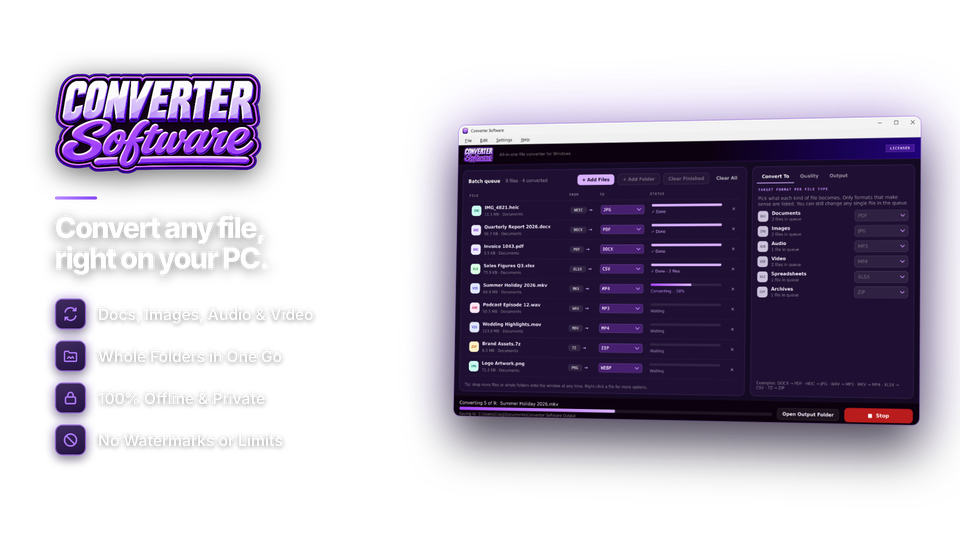
Drag in files or a whole folder - sub-folders included - and mix documents, photos, audio and video in the same batch. Set what each kind of file should become, change any single file in the queue, and watch the progress of every file and the whole batch. Only formats that make sense for each file are offered.
Quality presets you control
Use one-click presets for images, audio and video, or set quality, compression, resolution and bitrate yourself. Save your settings under a name and reuse them, or make them your defaults for every session.
Output folder and file names
Save into one output folder or next to the originals. Keep the original names or add a prefix, suffix, numbering or a date stamp. Originals are never overwritten - a same-name file is saved as "name (2)".
Private by design
Offline, with no limits and no watermarks
Every conversion runs on your own PC, so contracts, payslips, family photos and unreleased work never leave your computer. There are no file size caps, no daily quotas and no watermarks. The internet is only used to activate your license and check for updates.
Convert documents, images, audio and video.
Six file families in one app. Pick a file and you only see the formats it can become.
| Family | Formats | Popular conversions |
|---|---|---|
| Documents | PDF DOCX DOC ODT RTF TXT HTML MD EPUB | Word to PDF, PDF to Word, PDF to images |
| Images | JPG PNG HEIC WebP GIF BMP TIFF ICO AVIF | HEIC to JPG, WebP to PNG, GIF to MP4 |
| Audio | MP3 WAV FLAC AAC M4A OGG WMA Opus | WAV to MP3, FLAC to MP3 |
| Video | MP4 MKV MOV AVI WMV WebM FLV M4V MPG 3GP TS | MKV to MP4, MOV to MP4, video to MP3 |
| Spreadsheets | XLSX XLS ODS CSV TSV | XLSX to CSV, sheet to PDF |
| Archives | ZIP 7Z TAR GZ | Repack, or extract to a folder |
How to convert files in four steps.
If you can drag and drop a file, you can convert it.
Add files
One file or a whole folder.
files 38
Choose formats
Only sensible options are shown.
HEIC → JPG
Tweak if you like
Quality, folder and naming.
naming keep
Convert All
Watch the queue finish.
originals kept

For the files that get in your way.
Photos and videos that just work
iPhone photos your PC won't open and videos your TV won't play - converted in seconds, a whole folder at a time.
The format they asked for
Send Word files as PDFs, turn spreadsheets into CSV and batch-convert reports without uploading confidential files.
Media ready to share
Shrink audio, convert recordings to MP4 and pull the audio out of lecture videos.
One license. Every format. Yours to keep.
All six file families are included, with no file size limits, watermarks or daily quotas. No subscription. Free updates.
- File families6, all included
- Filesno size or count limit
- Works onWindows 10 & 11 (64-bit)
- Updatesfree
- Activations1 PC
- Deliverydownload + key by email
Checkout
You'll go straight to your download page once payment is confirmed, and we'll email your download link and license key.
Already bought? Get your download link again.
File conversion questions, answered.
How do I convert Word to PDF without uploading the file?
Drop the DOCX into Converter Software, choose PDF and click Convert All. The conversion happens on your own PC, so nothing is uploaded.
How do I convert HEIC photos to JPG on Windows?
Add the HEIC files or the whole folder, choose JPG and convert. You can resize the photos, set the JPG quality and strip metadata in the same pass.
Can I convert lots of files at once?
Yes. Drag in a whole folder, sub-folders included, even with mixed file types. Set what each kind of file should become, change any single file if you like, and convert them all in one batch.
Can it convert PDF to Word?
Yes. A PDF can be converted to Word (DOCX), plain text or other document formats, or to PNG or JPG images with one image per page.
Will converting reduce quality?
You control it. Presets aim for high quality, and you can set quality, compression, resolution and bitrate yourself. Lossless formats such as PNG and FLAC keep full quality, while JPG and MP3 trade a little quality for much smaller files.
Can it convert MKV or MOV video to MP4?
Yes. MKV, MOV, AVI, WMV and other videos convert to MP4, and you can save just the soundtrack of a video as MP3.
Will it overwrite my original files?
No. Converted files are saved to the output folder you choose or next to the originals, and an existing file is never replaced: a same-name file is saved as "name (2)".
Does it add watermarks or limit file size?
Never. There are no watermarks, file size limits or daily quotas.
Are my files uploaded anywhere?
No. Every conversion runs on your own Windows PC. The internet is only used to activate your license and check for updates.
Can I try it before buying?
Yes. Install Converter Software and you can add files and set formats and quality straight away. Converting unlocks when you enter your installation key.
Which versions of Windows are supported?
Windows 10 (version 1809 or later) and Windows 11, 64-bit.
Is it a subscription?
No. It is a one-time payment of $39.95 with free updates.
How do I get the software after paying?
You go straight to your download page once payment is confirmed, and your download link and installation key are emailed to you. In Converter Software, choose Settings > Enter Installation Key and click Activate.
Stop fighting with file formats.
Any file in, the format you need out, offline on your PC. One license, no subscription.
Get Converter Software · $39.95